
Rollback
Every deployment creates a new static release of your website. If something doesn't look right after publishing, Static Studio makes it easy to restore a previous version.
The Rollback feature allows you to redeploy an earlier static snapshot with a single click, helping you quickly recover from accidental changes, broken deployments or unexpected issues.
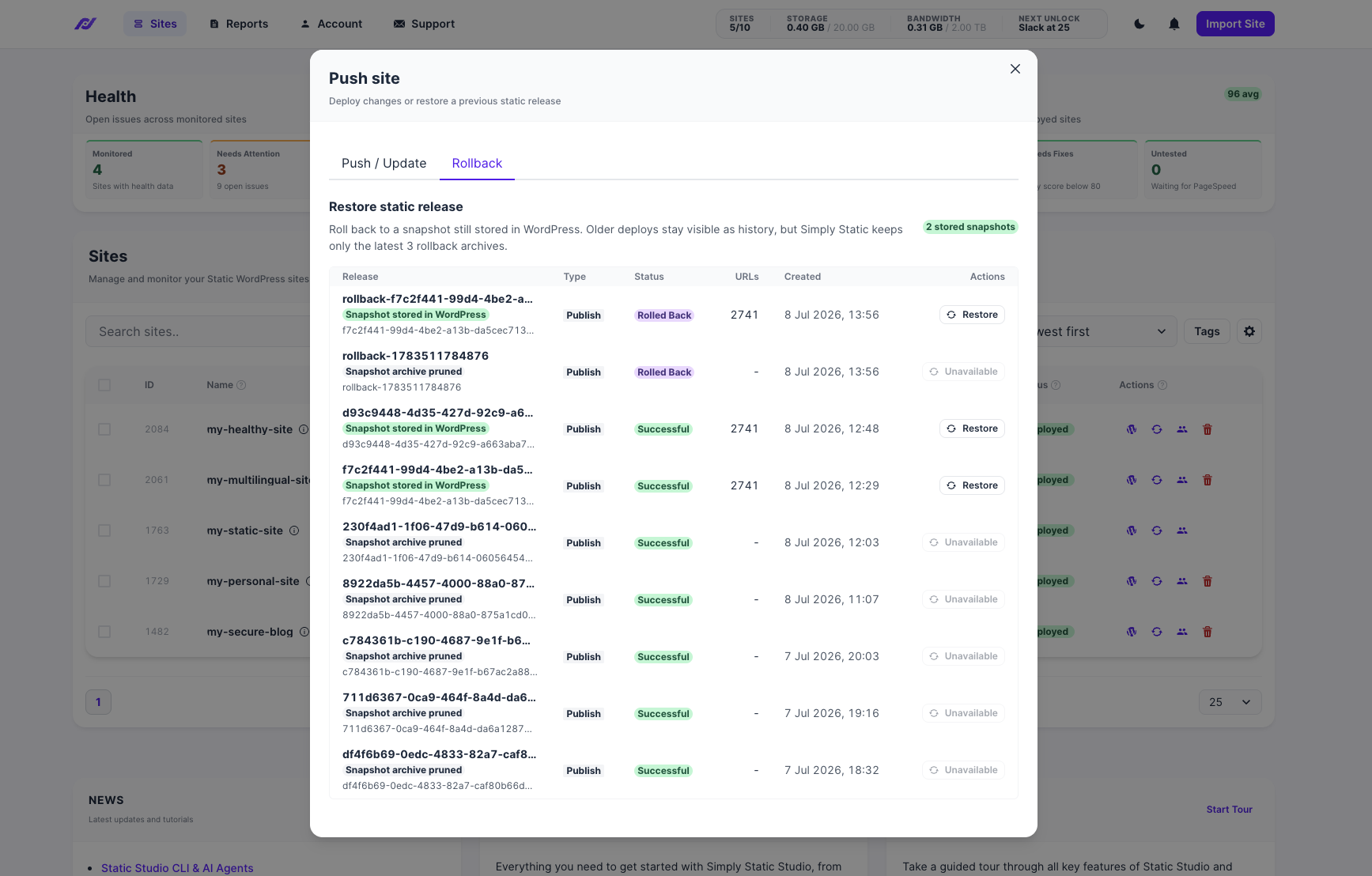
Open Sites → Push Site → Rollback to view available snapshots.
How Rollback Works
When you publish a new version of your website, Simply Static stores a snapshot of the generated static files inside your WordPress installation.
These snapshots can later be restored directly from Static Studio without generating a completely new export.
Each available snapshot includes:
- Release ID
- Export type
- Deployment status
- Number of generated URLs
- Creation date
Selecting Restore republishes that snapshot as your active static website.
Available Snapshots
To help conserve storage space, Simply Static only keeps a limited number of rollback snapshots.
Snapshots currently stored inside WordPress can be restored immediately.
Older deployments remain visible in the deployment history, but once their associated snapshot has been removed, they can no longer be restored.
These deployments are marked as Unavailable.
Restoring a Previous Release
To restore an earlier version of your website:
- Open Sites → Push Site → Rollback.
- Locate the snapshot you want to restore.
- Click Restore.
- Confirm the deployment.
Static Studio republishes the selected snapshot, making it your active website.
The rollback itself is recorded as a new deployment, ensuring you always have a complete deployment history.
When Should I Use Rollback?
Rollback is useful whenever you need to quickly return your website to a previously working state.
Common situations include:
- A deployment introduced unexpected changes.
- A page or asset was accidentally removed.
- A plugin update generated incorrect output.
- A deployment completed successfully, but the published result wasn't what you expected.
Because the snapshot already exists, restoring it is often much faster than rebuilding and exporting the site again.
Snapshot Storage
Rollback snapshots are stored inside your WordPress installation.
To avoid excessive storage usage, older snapshots are automatically removed over time.
Once a snapshot has been pruned, it can no longer be restored, although the deployment record remains available for historical reference.
Frequently Asked Questions
Does Rollback restore my WordPress website?
No.
Rollback only restores the previously generated static website. Your WordPress installation, database, and content remain unchanged - you can use our backup mechanism instead.
Can I roll back to any previous deployment?
Only deployments that still have a stored snapshot can be restored.
If the snapshot has already been removed, the deployment will appear as Unavailable.
Why are older snapshots removed?
Snapshots are stored inside your WordPress installation.
To keep storage requirements manageable, Simply Static automatically retains only a limited number of rollback snapshots.
Will rolling back delete my current deployment?
No.
The rollback creates a new deployment using the selected snapshot. Your deployment history remains intact, allowing you to track when a rollback occurred.
Can I deploy a newer version again after rolling back?
Yes.
A rollback simply republishes an earlier snapshot. You can always publish a newer version again whenever you're ready.