
Custom Domain
Connect your own domain when you are ready to publish the static site at its public address. The custom domain serves the static website; your private WordPress editing address stays separate.
Open Domain settings
On Sites, click the site name, then open Site Details → Domain. The current workflow has three steps: enter your domain, update DNS, and let Studio verify and secure it.
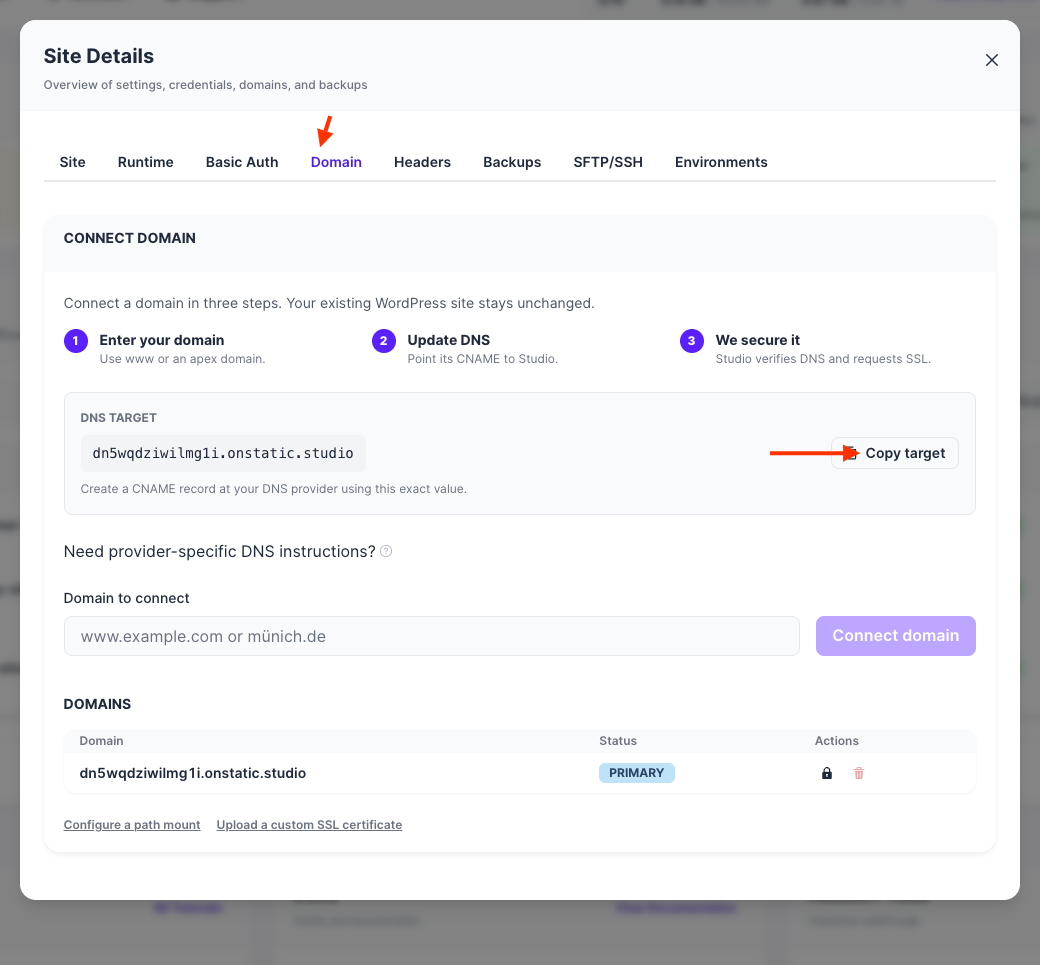
Create the DNS records
Copy the exact DNS target shown for your site. Add records at the DNS provider that currently manages your domain:
| Address | Type / name | Target |
|---|---|---|
| www.example.com | CNAME / www | The Studio DNS target |
| example.com | Apex-compatible CNAME, ALIAS, or equivalent / @ | The Studio DNS target |
An apex domain needs a DNS provider that supports an appropriate alias or CNAME-flattening feature. Cloudflare is one supported option and automatically flattens apex CNAME records. With Cloudflare, use DNS only for the Studio records. If your provider cannot alias the apex to a hostname, use a www subdomain or move DNS to a compatible provider.
Configure both www and the apex if you want Studio to serve and redirect between both versions. Replace conflicting website records for those hostnames as needed, while retaining unrelated mail and verification records.
Connect and secure the domain
- Enter the hostname, such as
www.example.com, in Domain to connect. Do not include a URL path. - Click Connect domain.
- Follow the displayed DNS verification status. Studio requests SSL as part of connecting the domain.
- Check the connected-domain list and open the public HTTPS address after setup succeeds.
If DNS is not ready, Studio may offer to prepare the domain and export before you switch DNS. Follow that prompt carefully and complete the DNS change afterward. An SSL warning needs attention even if the hostname has been added; correct DNS and use the available SSL retry action when offered.
Primary domain and redirects
The primary domain is the public address used by your site. Use Set Primary beside another connected domain to change it. Other connected hostnames redirect to the primary address. Review www and apex behavior after changing the primary domain.
Serve only a path on another host
To keep an application on the main domain and serve Studio under a path such as /blog, use Configure a path mount. DNS alone cannot route one URL path.